
How to Find and Fix Broken Affiliate Links in WordPress
Quick answer: To find broken affiliate links in WordPress, check Google Search Console for 404 errors on your own site, crawl your site for outbound links that return errors, and spot-check top products that still load but can’t be bought. Fix the links with the most clicks first. If your links are managed in one place, one edit fixes every post.
A broken affiliate link doesn’t announce itself. The post keeps ranking, readers keep clicking, and the commission quietly stops. Programs close, merchants restructure their URLs, products go out of stock, and every older post keeps pointing at them.
This guide covers three ways to find broken affiliate links (two of them free), the five kinds of breakage that most checkers miss, why Amazon links fail in particular, and how to fix everything in the order that recovers the most money.
Disclosure: we build Link Manager Pro, one of the tools in this guide. The free methods come first, and we say plainly what our plugin catches and what it doesn’t.
How much does a broken affiliate link cost?
A broken affiliate link costs every commission it would have earned while it was broken. You can estimate the monthly loss for any link with three numbers you already have:
Example (illustrative numbers, not data from a real site): a link in a popular review gets 400 clicks a month, converts at 3%, and pays an average commission of $12. That is 400 × 0.03 × $12 = $144 a month, or $1,728 a year, from one link that nobody noticed had stopped working.
Two costs don’t show up in that formula:
- Reader trust. Someone who clicks your recommendation and lands on an error page blames your site, not the merchant.
- Wasted rankings. The post still earns its search traffic, but the traffic no longer turns into anything.
What broken links usually don’t cost you is rankings. Google says 404 errors don’t harm a site’s indexing or ranking (Google Search Console Help). For an affiliate site, the real damage is money and trust, so that is how this guide prioritises fixes.
The 5 kinds of broken affiliate links
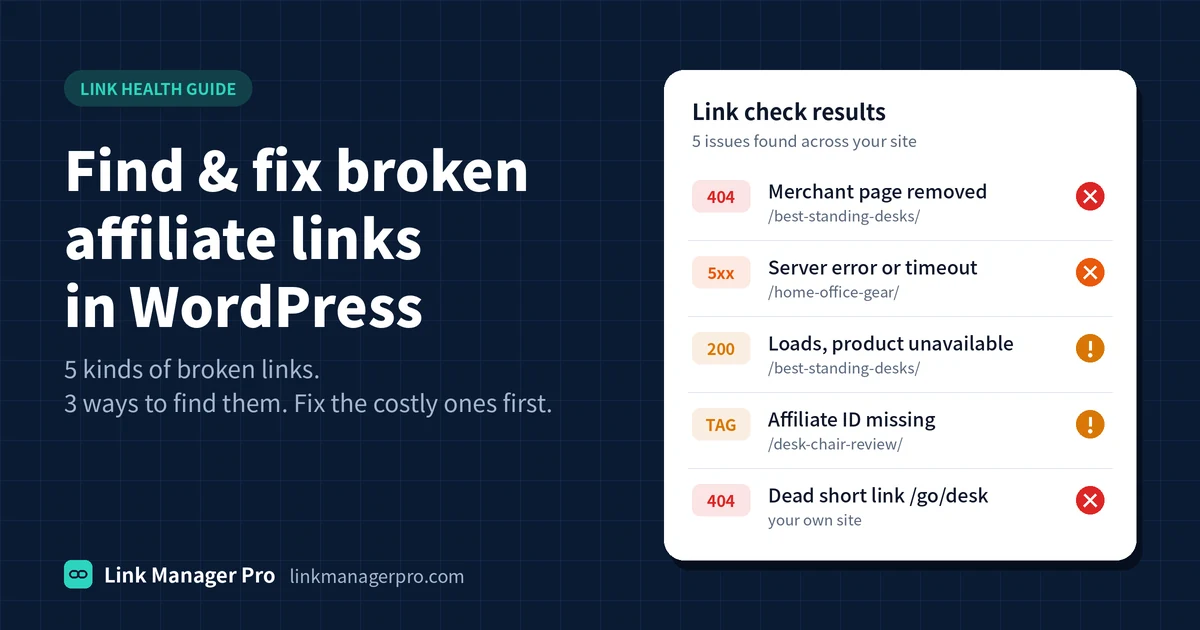
Most link checkers only look for error pages, which covers two of the five ways an affiliate link breaks. The other three load normally and still earn nothing.
| Kind | What the reader sees | Typical cause | What catches it |
|---|---|---|---|
| 1. Dead destination | A “page not found” error (404) or “gone” (410) | The merchant removed or moved the page | Site crawlers and link checkers |
| 2. Server error or timeout | An error page (5xx) or a page that never loads | The merchant’s site is down, or it blocks automated checks | Site crawlers; recheck by hand before acting, as these are often temporary |
| 3. Soft-broken | A normal page with nothing to buy | Product discontinued or unavailable, or the merchant redirects to its homepage | Manual spot-checks of your top-earning links |
| 4. Tracking-broken | Everything works, but no commission is recorded | Missing or wrong affiliate ID, an expired program, or a changed link format | Your affiliate dashboard: clicks with zero orders over weeks |
| 5. Your own short link is dead | A 404 on your domain | A deleted or renamed /go/ or /link/ URL | Google Search Console and a 404 monitor |
Kinds 3 and 4 are the expensive ones, because nothing looks wrong. Google uses the term “soft 404” for a closely related problem on your own site: a missing page that returns a normal page or redirects to the homepage instead of a proper error.
How to find broken affiliate links in WordPress: 3 methods
Use the free methods for a one-off audit and continuous monitoring to catch new breaks between audits. Each method covers different kinds from the table above.
Method 1: Google Search Console (free)
Search Console shows URLs on your own domain that return 404 errors, which is how you find dead short links (kind 5) and deleted pages that readers still reach.
- Open Search Console and go to Indexing → Pages.
- Under the reasons a page isn’t indexed, open Not found (404).
- Look for your short-link paths, such as /go/ or /link/, and for old posts or pages you deleted.
- For each one, inspect the URL to see where Google found it, then fix the link at its source or redirect the URL to its closest replacement.
What it misses: Search Console only reports on your own URLs. It doesn’t test the outbound affiliate links in your posts, so it can’t find kinds 1 to 4.
Method 2: Crawl your site with a free SEO crawler
A desktop crawler visits every page and checks every link it finds, including outbound affiliate links. Screaming Frog SEO Spider is free for crawls of up to 500 URLs, which suits smaller sites.
- Enter your homepage URL and start the crawl.
- Open the External tab and filter by Client Error (4xx), then by Server Error (5xx).
- Export the list together with the pages that contain each link (the “inlinks” export), so you know which posts to edit.
- If you use short links such as /go/product, check where each redirect ends up, not just the short URL itself. A short link can work perfectly while the merchant page behind it is dead.
What it misses: a crawl is a snapshot, so new breaks go unnoticed until you crawl again. Some merchants block crawlers and return errors that aren’t real (often 403 or 429), so recheck those by hand. Crawlers can’t see soft-broken or tracking-broken links (kinds 3 and 4).
Method 3: Monitor continuously inside WordPress (Link Manager Pro)
One-off audits find today’s broken links; monitoring catches the ones that break next month. This is the job we built Link Manager Pro’s Link Health screen for. It keeps broken links in your content and visitor 404 errors in one list.
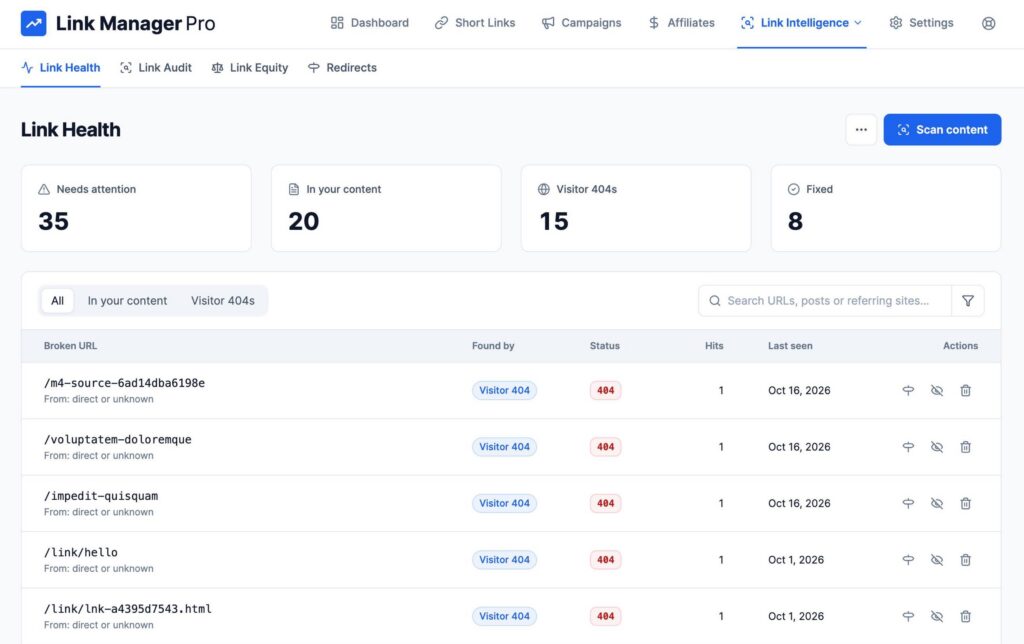
[Screenshot: the Link Health screen on our test site, showing a broken outbound link and a 404 entry]
Run your first scan
- In your WordPress dashboard, open Link Manager → Link Health and start a scan.
- The scan works through your published posts and pages and tests the external links in each post’s content. It sends a lightweight request first and retries with a normal page request when a server rejects that, follows up to five redirects, and flags any link that returns 404 or 410.
- Each result shows the broken URL and the post it sits in, so you can open the post and fix it.
Make it automatic
- Under Settings, set Automated Link Health Scans to Daily or Weekly. It is off by default, and WordPress’s own Site Health screen warns you while it stays off.
- 404 Traffic Monitoring is always on. It logs visitors who hit a missing URL on your site, with the referring page and a hit count. The default Smart (Sitemap-based) mode only logs URLs listed in your sitemap and ignores bot probes. Short-link URLs usually aren’t in your sitemap, so choose All if you want dead /link/ URLs logged too.
- Turn on the Email Digest (weekly or monthly) to get the broken-link count in your inbox, or use the built-in AutomatorWP trigger for “broken link found” to send alerts anywhere else.
Fix from the same screen
- Point a 404 URL at one of your managed links with Create Redirect.
- Mark an issue Fixed, or use Ignore Issue for false alarms such as a merchant that blocks automated checks.
- If your affiliate links are managed short links, edit the destination once under Short Links and every post that uses it is fixed at once. Each link’s click count tells you which fixes are worth doing first.
What it doesn’t catch: like any automated checker, it can’t tell that a product is unavailable on a page that loads normally, or that a link is missing your affiliate ID (kinds 3 and 4). In version 1.2.0, the content scan checks up to 10 external links per post and skips links that already point to your own short-link URLs, so pair it with a crawler (Method 2) on long roundup posts and for checking where your short links end up.
You can try the Link Health screen without installing anything on our live demo site.
Amazon affiliate links not working? 5 causes to check
Amazon links fail in more ways than most, because the link can work perfectly while the sale isn’t credited to you. Check these in order. Policy details below come from Amazon’s Associates Program Policies (checked October 16, 2026; Amazon updates them regularly).
- The product is unavailable or discontinued. The product page often still loads, so link checkers report it as fine. Open your top-earning Amazon links by hand every month, and replace any you can no longer buy with an in-stock product you would genuinely recommend.
- Your Associates ID is missing or wrong. Amazon requires every link to include the tracking ID it assigned you, and purchases that aren’t tracked because a link isn’t properly formatted don’t earn a commission. Open the link and check that the
tag=value matches your ID exactly. - A shortened or redirected link dropped your tag. Add your ID before shortening, then click the final link and check the address bar. Amazon also requires that it stays clear to readers that a link goes to Amazon, so label shortened links (“View on Amazon”).
- The promotion ended. Amazon requires you to remove references to a limited-time promotion once it ends, so retire “deal” links and the copy around them on schedule.
- The visitor is in another country. Each Amazon store runs its own Associates program, so a reader sent to a different country’s store may not earn you anything there. Check which stores your account covers in Associates Central before assuming a link is broken.
If a link looks fine but your Associates reports show clicks with no orders for weeks, treat it as tracking-broken (kind 4) and test it from a private browser window.
How to fix broken affiliate links (in the order that pays)
Fix the links that get the most clicks first; a dead link nobody clicks costs you nothing. Then choose the fix based on what broke.
- Put every broken link in one list, with the post it appears in. Combine the results from the methods above.
- Sort by clicks. Use your link manager’s click counts, Google Analytics outbound-click events, or your affiliate network’s reports.
- Choose the fix for each link, using the table below.
- Retest the link after the fix, from a private browser window.
- Mark it fixed in your tracker or tool, so it doesn’t come back as noise next time.
| Situation | Fix |
|---|---|
| Same product, new URL | Replace the destination. With a managed short link, edit it once and every post updates. |
| Product gone, good alternative exists | Link to the alternative only if you would genuinely recommend it, and update the sentence around it. |
| Product gone, no alternative | Remove the link and rewrite the sentence so the post still reads well. |
| Program closed or your ID was removed | Join another program for the same merchant, or replace the merchant. |
| One of your own pages or short links was deleted | Redirect it to its closest real replacement. If there isn’t one, let it return a 404. Google advises against redirecting missing pages to your homepage (Google). |
Prevention checklist
- Use managed short links instead of pasting raw affiliate URLs into posts, so one edit fixes every post.
- Schedule an automatic scan at least weekly.
- Once a month, open your 10 highest-earning links by hand to catch unavailable products.
- Once a month, compare clicks against orders in each affiliate dashboard; clicks with no orders point to a tracking problem.
- Read program emails: link-format changes and program closures are usually announced in advance.
- Keep a 404 monitor running on your own site.
Frequently asked questions
How often should I check my affiliate links?
Run an automated scan at least weekly and a manual review once a month. Scans catch dead pages and server errors as they happen. The monthly hand check of your top-earning links catches unavailable products and missing tracking IDs, which automated tools can’t see.
Do broken affiliate links hurt SEO?
Not directly. Google says 404 errors don’t harm a site’s indexing or ranking. The real costs of broken affiliate links are lost commissions and reader trust, which is why it pays to fix them in order of clicks rather than all at once.
What is the best free way to check affiliate links in WordPress?
Combine Google Search Console, for 404s on your own site, with a desktop crawler such as Screaming Frog SEO Spider, which is free for up to 500 URLs and checks outbound links. Rerun the crawl monthly, or add a plugin that scans on a schedule.
Why are my Amazon affiliate links not earning commissions?
Usually the product is unavailable, your Associates ID is missing from the final link, or the reader landed in a different country’s Amazon store. Click the link from a private window, check the tag= value in the address bar, and confirm the product can actually be bought.
Can a plugin fix broken affiliate links automatically?
Partly. A plugin can find broken links, redirect your own dead URLs and update a managed link in every post at once. Choosing a replacement product is an editorial decision, so a person should make it.
What’s the difference between a 404 and a 410 error?
A 404 means the page wasn’t found; a 410 means it was removed on purpose. Google currently treats them the same way, so either is fine for a page you deleted deliberately (Google).
Try it on a live site
See the Link Health screen, short links and click stats working on a real WordPress install: open our live demo site. There is nothing to install.
Sources
- Google Search Console Help: 404 (Page Not Found) errors
- Amazon: Associates Program Policies, updated April 14, 2026
- Screaming Frog: SEO Spider pricing and free version limits