Link Manager Pro 1.2.0: an AI Link Assistant that lives inside your editor
Link Manager Pro 1.2.0 is here, and it’s our biggest update since launch.
The AI Link Assistant will help with internal-linking suggestions, one-click shortening of untracked URLs, and a selected-text link action, all working inside both the Gutenberg and the Classic editor.
This release also opens the in-editor tools to your authors and editors, adds one-click social sharing with automatic UTM tagging, and makes reporting noticeably faster.
In short: Link Manager Pro 1.2.0 brings AI-assisted internal linking, an editor-level access tier, social sharing, a dashboard Quick Add, and faster analytics to WordPress link management.
What’s new at a glance
| Area | What you get in 1.2.0 |
|---|---|
| AI Link Assistant | Internal-link suggestions, untracked-URL detection & one-click shorten, and an “AI Link” action on selected text — in Gutenberg and Classic |
| Editor access tier | Authors and editors can shorten links and use the assistant on their own posts, without full admin access |
| Social sharing | Share any short link to X, Facebook, LinkedIn, WhatsApp, Telegram, Reddit, or email — with per-platform UTM tags |
| Dashboard Quick Add | Create a tracked short link from the WordPress dashboard in seconds |
| Redirect targeting | Route visitors by device, OS, and browser — on top of country, click count, and schedule |
| Site Health | Six new checks for broken links, coverage, GeoIP freshness, and webhook backlog |
| Analytics & speed | Exact device / OS / browser / country / referrer / UTM breakdowns, cached reports, faster redirects |
What is AI Link Assistant?
The AI Link Assistant is a panel in the WordPress editor that helps you build better internal links as you write. It appears in the block editor’s sidebar and document panel, and as a meta box plus a toolbar action in the Classic editor.
It does three jobs:
- Smart Suggestions. Click Analyze content and the assistant reviews your post, then recommends the most relevant existing short links from your own library to insert — each with a one-click Insert & Highlight.
- Links to Shorten. It scans your content for untracked
http(s)URLs and lets you convert any of them into a tracked short link in one click. This part needs no AI at all. - AI Link on selected text. Highlight a phrase, and the assistant surfaces matching short links you can apply right there.
Bring your own AI or use WordPress core
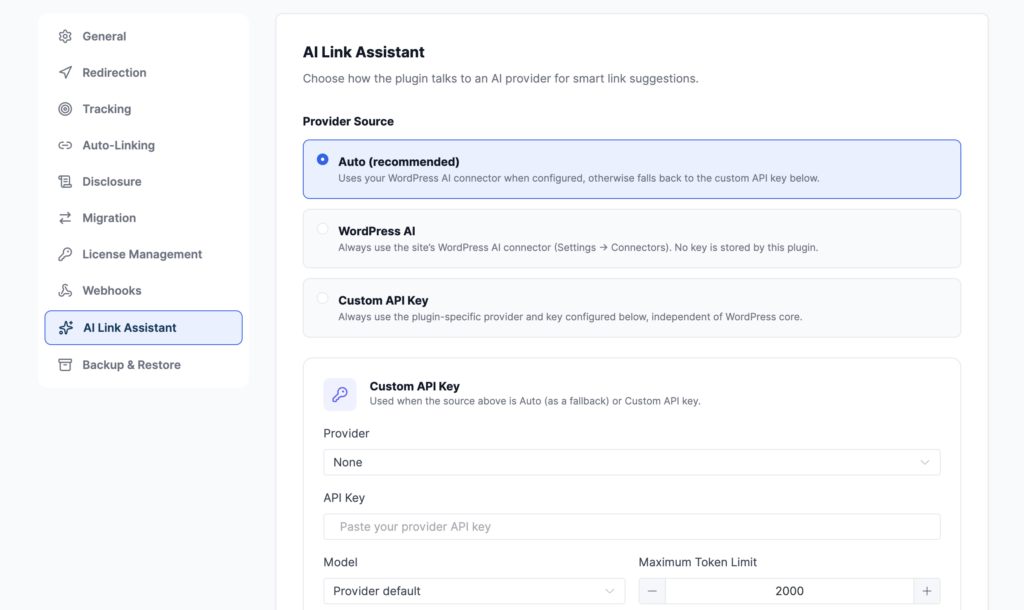
You have two ways to power the assistant:
- WordPress core AI Connectors (WordPress 7.0 and later). If your site already has an AI provider configured through core’s Connectors, Link Manager Pro uses it — no separate key required.
- Your own API key for OpenAI, Google Gemini, or Anthropic. Paste a key on the settings screen, run Test Connection, and you’re set.
Your API key is stored encrypted at rest (AES-256-CBC), and the settings screen only ever shows a masked value — the plaintext key never leaves the server after you save it.
Built to be safe and predictable
- The AI can never invent a link. Suggestions are drawn only from your own existing short links, matched by index against a server-verified candidate list. A model can’t fabricate a URL or an anchor that isn’t literally in your content.
- Your budget is protected. AI requests are rate-limited per user, so a busy author, or a misbehaving script, can’t run up your provider bill. Cached results are served without re-billing.
- It degrades gracefully. No provider configured? Untracked-URL detection and one-click shortening still work. An AI call fails? You get a clear message, not a broken editor.
A new “editor” access level
Before 1.2.0, the in-editor link tools required full plugin-admin access. That never made sense for a hired writer.
Now, authors and editors can shorten URLs and use the AI Link Assistant on their own posts using standard WordPress post-editing permissions — no full plugin administration required.
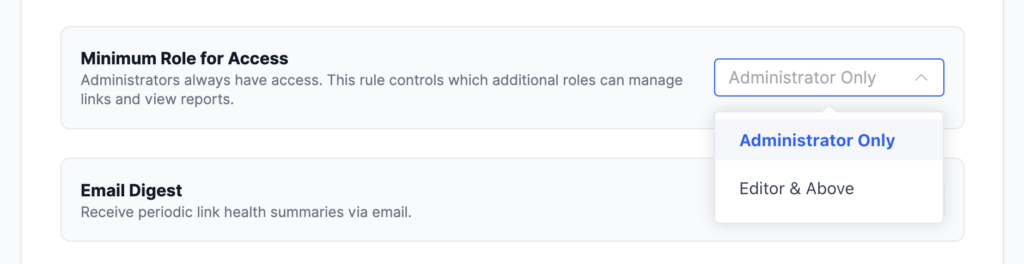
Your admin dashboard, settings, and link management stay admin-only. Your content team gets the tools they need, and you keep control of the rest.
Share short links straight to social
Every link’s details page now has a Share row: X (Twitter), Facebook, LinkedIn, WhatsApp, Telegram, Reddit, and email.
Click a network and Link Manager Pro opens its share dialog pointed at your tracked short link, with per-platform UTM parameters applied automatically (utm_source=twitter&utm_medium=social, and so on).
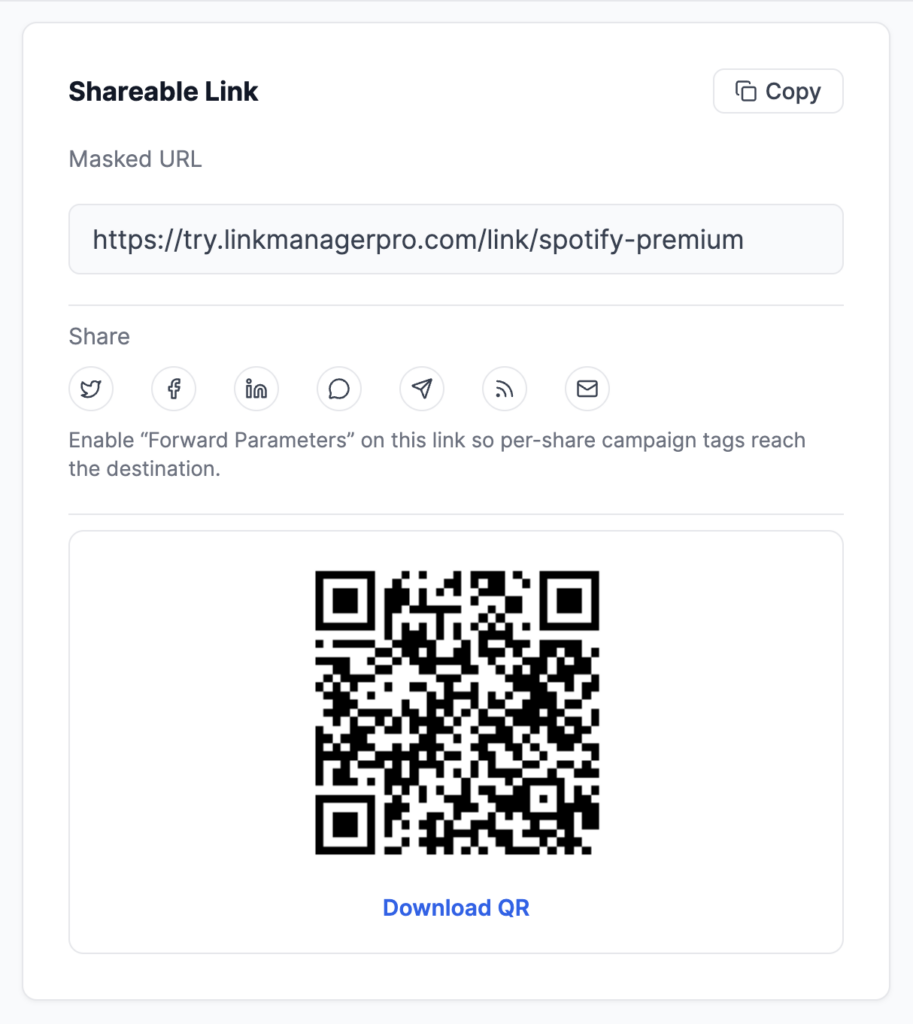
That means you can see, in your own reports, which network drove each click, without hand-building tagged URLs. The platform list is filterable, so developers can add or adjust networks.
Create a short link from your dashboard
The new Quick Add dashboard widget lets you shorten and track a URL in seconds without opening the plugin: paste a target URL, tweak the auto-suggested slug if you like, and click Create Short Link. You get the masked URL and a copy button right there.
Smarter redirects, deeper analytics, faster reports
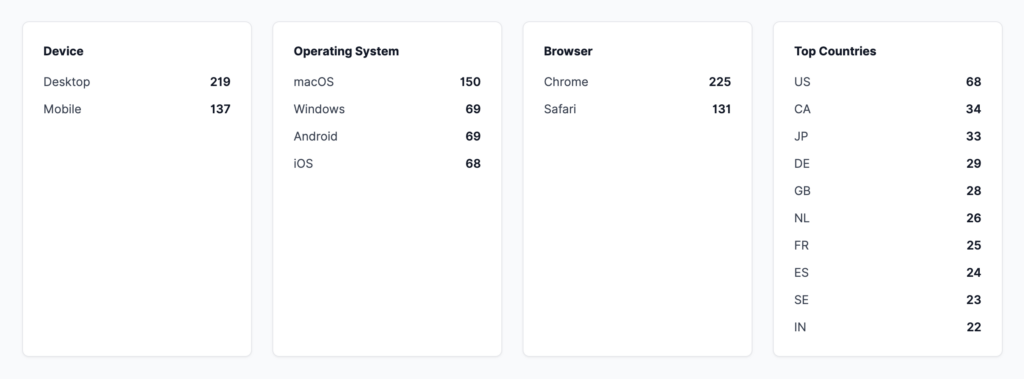
- Device, OS & browser targeting. Conditional redirect rules can now route visitors by device type, operating system, and browser family — alongside the existing country, click-count, and date/time conditions.
- Deeper analytics. Link and affiliate reports now show exact device, OS, browser, country, referrer, and UTM breakdowns, and the CSV export adds browser and referrer columns.
- Inbound UTM capture. Record the UTM parameters your visitors arrive with.
- Faster by default. Report breakdowns are cached and can be scoped by date range, and slug lookups are cached on the redirect path — so high-traffic links load their reports quickly and redirect fast.
- Six new Site Health checks surface broken links, your link-coverage grade, GeoIP freshness, webhook backlog, and more, right inside WordPress’s Site Health screen.
Upgrade notes & compatibility
- It’s a drop-in upgrade. No manual migration steps.
- Your categories and tags carry over automatically. Internal link category and tag data from earlier versions is relabeled on first admin load — you don’t have to do anything.
- Requirements: WordPress 6.0 or higher (tested up to 7.0.3) and PHP 8.0+.
- Redirect and tracking behavior is unchanged for existing links.
- The AI Link Assistant is a premium capability and requires an active license; untracked-URL detection and one-click shortening work regardless.
Frequently asked questions
Do I need an OpenAI, Gemini, or Anthropic account to use the AI features?
Not necessarily. If your WordPress site (7.0+) already has an AI provider set up through core Connectors, Link Manager Pro uses it. Otherwise, you can add your own OpenAI, Google Gemini, or Anthropic API key.
Is my API key safe?
Yes. Your key is encrypted at rest with AES-256-CBC and shown only as a masked value in the admin — the plaintext is never re-exposed after you save it.
Can the AI insert a link to a page I didn’t choose?
No. The assistant can only suggest your own existing short links, validated server-side against your content. It cannot invent a URL or link text.
Will AI requests run up a big provider bill?
No. AI calls are rate-limited per user, and repeated identical analyses are served from cache without re-billing.
Can my writers use this without giving them full admin access?
Yes. In 1.2.0, authors and editors can shorten links and use the assistant on their own posts with normal post-editing permissions.
Does it work in the Classic editor?
Yes. The AI Link Assistant works in both Gutenberg and the Classic editor.
Will upgrading break my existing links or categories?
No. It’s a drop-in upgrade; redirects and tracking are unchanged, and your link categories and tags are migrated automatically.
Get Link Manager Pro 1.2.0
Update from your WordPress Plugins screen, or download the latest build from your Link Manager Pro account. As always, we recommend testing major updates on a staging site first.
If you didn’t get Link Manager Pro, grab our lifetime deal before it ends. We’re currently offering an amazing 50% discount on lifetime plans.