Link Manager Pro 1.3.0: more control over every short link
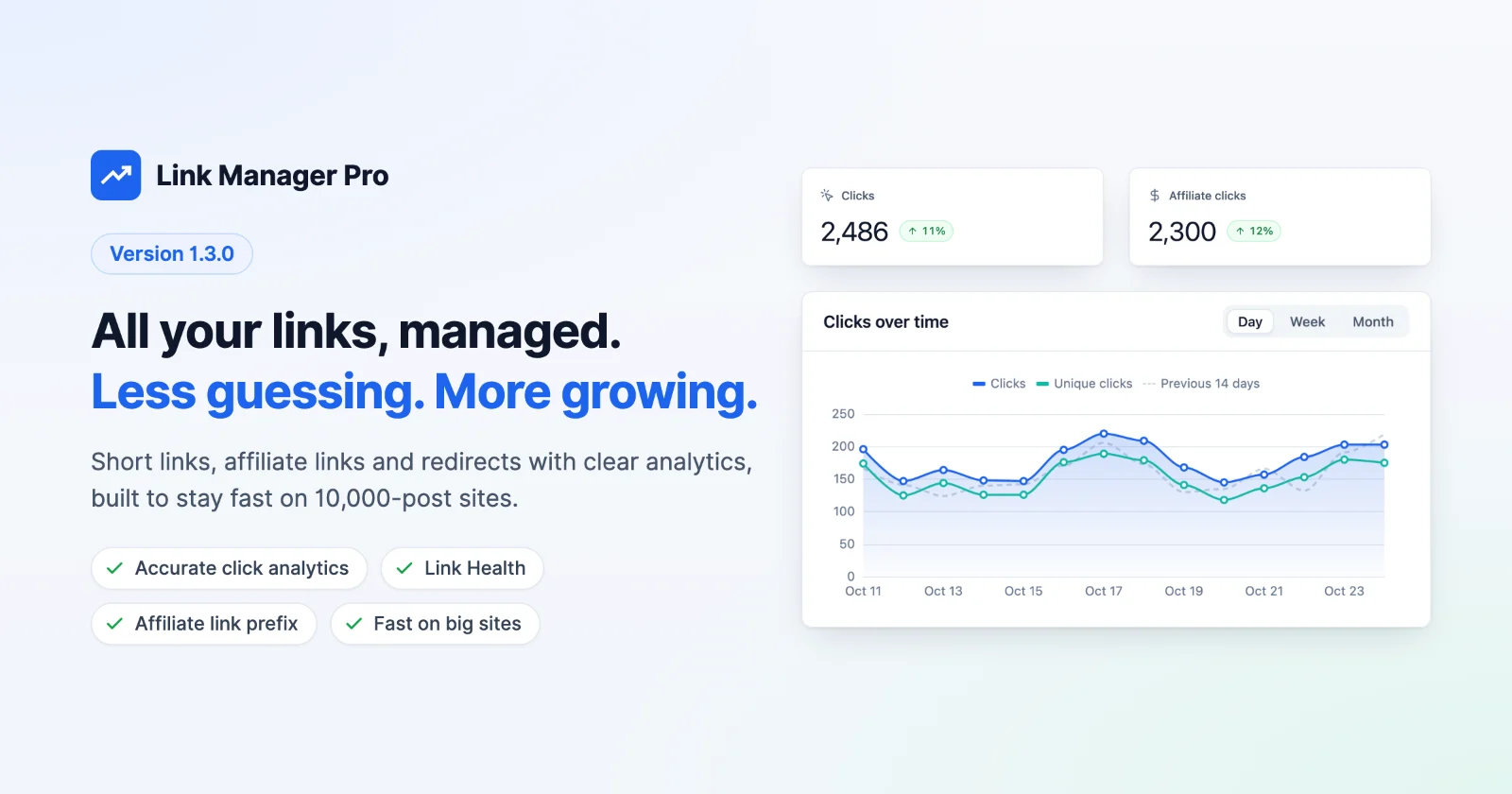
The new update of Link Manager Pro gives you more freedom over your short links without risking the ones you’ve already published.
You can now change your short link prefix or rename a slug, and every short URL already in your posts keeps working. A new affiliate link prefix gives links to your partners their own path, such as /recommends/.
Click tracking now counts only real visits and respects withdrawn cookie consent at once, imports from other link plugins keep every old address working, and reports, redirects and scans stay fast on large sites.
It’s also a stability release. We tested 1.3.0 end to end on a fresh install, an existing site with real data and a 10,000-post site.
In short: Link Manager Pro 1.3.0 lets you change your short link prefix and slugs without breaking published links, adds an affiliate link prefix, makes click tracking count only real visits and respect withdrawn cookie consent, and imports links from other plugins with their old addresses intact.
What’s new at a glance
| Area | What you get in 1.3.0 |
|---|---|
| Prefixes and slugs | Change the short link prefix or rename a slug and published short URLs keep working; new optional affiliate link prefix |
| Privacy and GDPR | Withdrawn cookie consent stops the tracking cookie at once; restored clicks follow your IP anonymisation setting; settings stay admin-only |
| Click accuracy | Browser preloads and HEAD requests no longer count, so click counts reflect real visits |
| Redirects and Link Health | Loop protection, redirects to a path such as /new-page, and broken links fixed in place |
| Large sites | Faster reports, redirects, post saves and scans, plus backups of any size |
| Imports from other plugins | Links, categories, clicks and keywords come over from ThirstyAffiliates, Pretty Links and BetterLinks, old addresses keep working, and a second run never duplicates |
| Old shortcodes | [thirstylink], <ta> and [prettylink] replaced with your short links after you review each post |
Move from ThirstyAffiliates without breaking a link
Link Manager Pro 1.3.0 imports ThirstyAffiliates directly, so you can switch plugins and keep every link in your posts, emails and social profiles working. If you’ve wanted a ThirstyAffiliates alternative but didn’t want to rebuild years of /recommends/ links, you no longer have to.
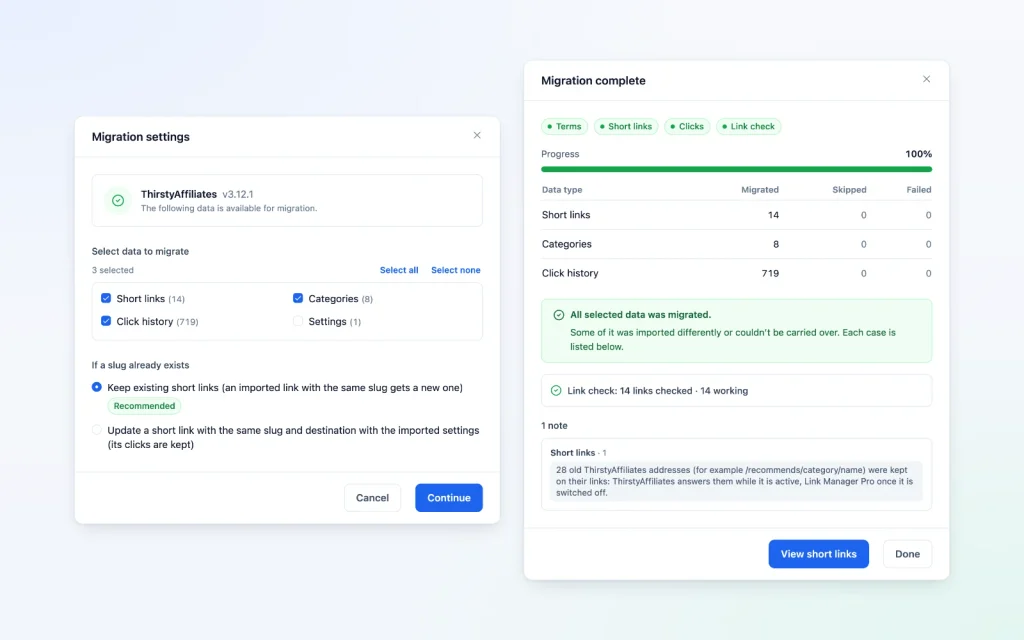
What is imported:
- Your links, with their destinations, 301, 302 or 307 redirect types, and nofollow, sponsored and query-forwarding settings. Where a link used a ThirstyAffiliates global setting, the import resolves it the way ThirstyAffiliates did, so each link behaves as before.
- Categories and click history, so your reports start with your past clicks, not at zero.
- Auto-link keywords. They wait while ThirstyAffiliates is active and start linking once you switch it off, so no word is linked twice.
- Geolocation links and before-start or after-expiry redirects from ThirstyAffiliates Pro, as routing rules. These run with an active licence.
- Your affiliates. Each destination domain is listed for you to review, and every one you keep becomes an affiliate, ready for affiliate reports.
What keeps working:
- Every old address.
/recommends/link-name,/recommends/category/link-nameand the same paths under any earlier prefix ThirstyAffiliates remembers. ThirstyAffiliates answers them while it’s active; Link Manager Pro answers them as soon as it is deactivated. - Your prefix. Setup and the import result both offer your ThirstyAffiliates prefix as the new affiliate link prefix, so new affiliate links look like the old ones.
- Your content. Link Manager Pro finds
[thirstylink]shortcodes and the block editor’s<ta>tags and offers to replace them with your short links. You review every post before anything is saved.
Built to be safe and predictable
- A Link check runs at the end. Every imported short link and old address is tested the way a visit would test it, and up to 100 problems are named.
- Re-running is safe. A second import adds only newer clicks and never overwrites links you’ve edited since.
- Nothing is dropped silently. Trashed links and ThirstyPay payment links aren’t imported, and settings Link Manager Pro has no place for (new window, CSS classes, images) are kept with the link and listed in the notes.
One limit worth knowing: ThirstyAffiliates doesn’t record full browser details, so imported clicks show device and browser as “Other”.
For developers. Run the same import on large sites with WP-CLI: wp link-manager-pro import --source=thirstyaff. The default run leaves out settings; add --items=settings to bring over the ThirstyAffiliates default redirect type.
See exactly how each field maps in Migrate from ThirstyAffiliates.
Pretty Links and BetterLinks imports that keep every address
Pretty Links and BetterLinks imports in Link Manager Pro 1.3.0 now work the same careful way as the ThirstyAffiliates import. If you’re looking for a Pretty Links or BetterLinks alternative, your old addresses, clicks and edits are kept.
- Old addresses keep working after you switch the old plugin off.
- Nothing merges or disappears. If a slug is already taken, the imported link gets a new slug and keeps its old address, instead of being skipped or merged into another link.
- Run it again safely. A second import never duplicates links, clicks or rules, keeps the edits you made, and doesn’t bring back links you deleted.
- A Link check at the end tells you what works, what was switched off as it was in the old plugin, and what needs a look.
- BetterLinks geo rules now send only visitors from their countries to the rule’s address. Routing rules need an active licence.
- Pretty Links
[prettylink]Shortcodes can be replaced in your posts with the same review step.
Read From Pretty Links or From BetterLinks, or see how Link Manager Pro compares with other plugins.
Change your short link prefix without breaking links
In Link Manager Pro 1.3.0, you can change your short link prefix or rename a slug, and every short URL you’ve already published keeps working.
Before 1.3.0, changing the prefix from /link/ to /go/ broke the short URLs already in your posts and shared elsewhere. That never made sense for a site with years of published links, so we fixed it.
- Old prefixes keep working. Addresses with the old prefix keep opening their links wherever nothing else on your site uses the same address.
- Update links in posts. Move the short links in your posts to the new prefix, choosing the posts page by page.
- New: an affiliate link prefix. Under Link Manager › Settings › General, give links to your affiliates their own path, such as
/recommends/…. Leave it empty to keep one prefix for everything. - Rename a slug, keep the old address. The option is ticked by default when you rename.
- Your pages always come first. A published page or post opens at its own address, even if a short link uses the same path.
One limit worth knowing: an old address does not open its link if a page, redirect or other short link uses the same path, and each short link keeps up to 25 other addresses. The Address conflicts tab on Link Manager › Short Links lists any clash.
For developers. wp link-manager-pro replace-prefix-links Updates post content from the command line. Add --affiliate for affiliate links and --dry-run to preview.
Follow the steps in Change your short link prefix.
Click tracking that counts only real visits
Link Manager Pro 1.3.0 counts each visit once. Browser preloads and HEAD requests no longer register as clicks, and sites behind Cloudflare record each visitor’s real address and country.
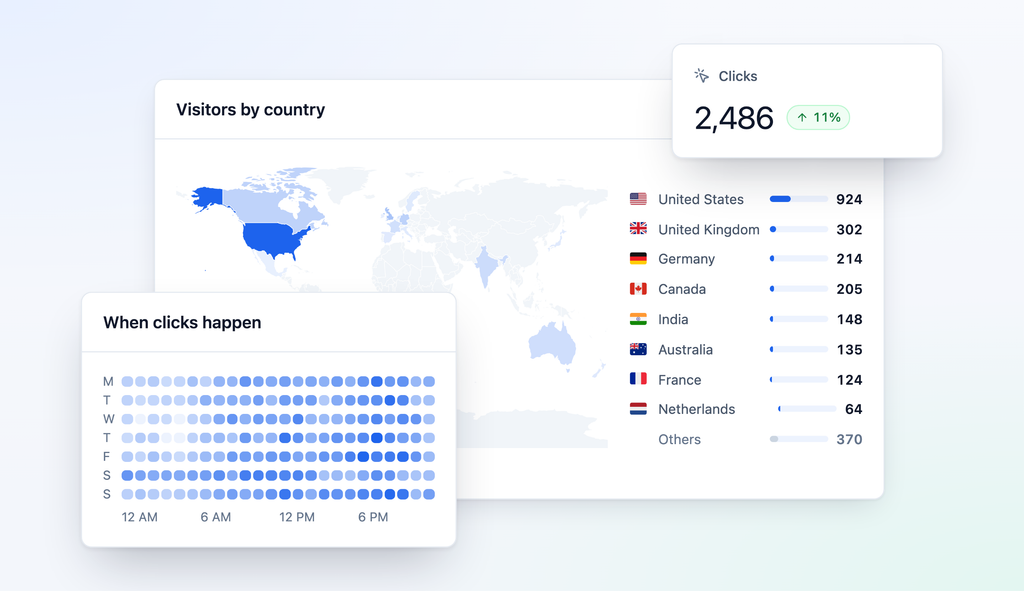
Before 1.3.0, Chrome could preload a short link in the background while you typed in the address bar. That preload looked like a visit, so one person could show up as a new click and a returning click.
- Preloads are recognised. Link Manager Pro reads the background-load headers Chrome, Firefox and Safari send (such as
Sec-Purpose: prefetch) and answers with an uncached 503 that sets no cookie. When the visitor actually follows the link, the browser loads it for real, and that visit counts once. - WordPress stops preloading short links. On WordPress 6.8 and later, short link paths are left out of WordPress’s speculative loading.
HEADRequests don’t count. Link checkers and bots that only ask for headers no longer add clicks.
One limit worth knowing: your click counts may look lower after updating. This comes from the preload filtering; past clicks stay as they were.
Learn what counts as a click in How clicks are counted.
Smarter redirects, faster scans, backups of any size
Link Manager Pro 1.3.0 also tightens redirects and Link Health, and stays fast on large sites.
- No redirect loops. A redirect that would lead back to itself is refused, during imports too.
- Redirect to a path. Point a redirect at
/new-pagewithout typing your full site address. - Fix broken links in place. Link Health can change where an existing short link leads, instead of creating another link.
- More reliable Simple Redirects. Paths with non-Latin or encoded characters redirect correctly, and redirects keep working after a move to a new address or to https.
- Cache-friendly scheduling. Cached pages refresh when a scheduled short link starts or expires.
- Faster on big sites. Reports, redirect pages and saving a post stay fast and within memory, and Link Audit’s Scan all posts and Link Health scans run several times faster.
- Backups of any size. Large backup files are sent in parts, backups hold all Link Manager Pro data, and a restore that can’t put back every row rolls back.
- Easier everyday work. Dates show in your site’s time zone, Back returns to a list with its filters and scroll position, saving works after WordPress asks you to log in again, and keyboard focus is visible on every link and button.
- Smaller improvements. Rename or delete tags, edit or delete UTM templates, see and change each link’s Link source, and block IP ranges such as
203.0.113.0/24.
For developers. wp link-manager-pro backup export and wp link-manager-pro backup restore work with no upload limit, and page-cache integrations can listen for the link_manager_pro_cache_should_purge action.
Read Back up and restore and Redirects for details.
Privacy, GDPR and security
Link Manager Pro 1.3.0 honours withdrawn cookie consent immediately, keeps sensitive settings with administrators, and leaves less personal data behind after backups and restores.
New in 1.3.0:
- Cookie consent respected. When a visitor withdraws consent in Complianz, CookieYes or Cookiebot, the tracking cookie stops at once and is deleted on their next short-link click. Clicks are still counted, without the cookie.
- Admin-only settings. Settings, backups, webhooks and the AI key stay with administrators, even when editors manage links.
- Less data left behind. Backup copies on the server are deleted a day or two after a backup or restore finishes, and restored clicks follow your Anonymize IP addresses setting.
- SSRF protection. Link Health and webhooks refuse internal and private network addresses, including cloud metadata (169.254.169.254) and carrier-grade NAT and Tailscale (100.64.0.0/10). Link Health checks every IPv4 and IPv6 address of a host on every redirect; webhooks do not follow redirects at all.
- Clean slugs. Slugs are checked wherever a link is created, so a slug can never carry HTML, and every short URL written into a post is encoded. Older slugs keep working and are listed in Link Audit.
- Verified downloads. The GeoIP database download is pinned to one release and checked against its checksum.
- WordPress Plugin Check. Link Manager Pro 1.3.0 passes WordPress Plugin Check with no errors.
Built-in privacy and GDPR controls
Link Manager Pro keeps visitor data under your control and gives you the settings you need to run click tracking under the GDPR.
- Click data stays on your site. Clicks are stored in your own WordPress database, and country lookups run on your server with a downloaded GeoIP database. Link Manager Pro contacts Solvix Studio only to check your licence and updates, and sends no visitor data.
- IP anonymisation. Anonymize IP addresses under Link Manager › Settings › Tracking shortens each IP address before it is stored (an IPv4 address keeps its first three parts). It is on by default for new installs.
- Automatic deletion. Keep click data for under Link Manager › Settings › Tracking deletes click records older than the number of days you set.
- Data subject requests. WordPress’s Export Personal Data and Erase Personal Data tools include Link Manager Pro click data, and suggested text for your privacy policy appears in WordPress’s Privacy Policy Guide.
- Consent first. With Respect visitor consent under Link Manager › Settings › Integrations, the tracking cookie waits until the visitor accepts the category you choose, such as Statistics.
One thing to check: without one of the supported consent plugins, the tracking cookie is set by default. If you use a different consent tool, a developer can connect it with the link_manager_pro_cookie_consent filter. These settings support your GDPR and UK GDPR obligations, but your privacy policy and consent setup remain your responsibility.
For developers. To allow one private webhook receiver, return true from WordPress’s http_request_host_is_external filter for its IP address.
See exactly what visitor data is stored in Privacy and personal data.
Upgrade notes & compatibility
Link Manager Pro 1.3.0 is a drop-in update: there’s no database change, and your links, redirects, settings and reports carry over.
- Requirements. WordPress 6.0 or later (tested up to 7.1) and PHP 8.0 or later. GeoIP country detection needs PHP 8.1 or later.
- Licence. Routing rules (including imported geo and schedule rules), Link Health scans, webhooks, AutomatorWP and the AI Link Assistant need an active licence. Everything else in 1.3.0, including all three imports and the tracking fixes, works whether or not your licence is active.
- Going back to an older version? If you set an affiliate link prefix, clear it and run Update links in posts first. Older versions don’t know the affiliate prefix.
What behaves differently. Redirect and tracking behaviour changes in a few deliberate ways:
- Click counts may look lower, because preloads and
HEADrequests no longer count. Past clicks don’t change. - A published page or post now wins over a short link with the same path.
- Link coverage scores change once, because the score now uses the share of posts that are orphaned, weak or have broken links.
- Auto-links and the affiliate disclosure no longer appear in feeds or archive pages, and the disclosure shows only on posts with affiliate links.
- Editors with delegated access no longer see the Settings menu.
- Existing sites keep adding site-wide UTM parameters to redirects to their own pages until you change the new setting; new sites start with it off.
How we tested 1.3.0
- Three kinds of site: a fresh install, an existing site with real data, and a site with 10,000 posts.
- Real plugin data: imports from ThirstyAffiliates 3.12, Pretty Links 4.0 and BetterLinks 3.1, each run twice to confirm nothing duplicates, then each old plugin switched off to confirm every old address still redirects.
- Real-world tracking: visits that Chrome preloads from the address bar and visits arriving through Cloudflare, to confirm one visit is one click with the right country.
- Every screen in the browser, case by case against a written test plan.
Getting 1.3.0
Update from Plugins in your WordPress admin, or download 1.3.0 from your Link Manager Pro account. As with any update, test it on a staging site first.
To move from ThirstyAffiliates:
- Back up under Link Manager › Settings › Backup & restore with Back up now, and keep ThirstyAffiliates active.
- Go to Link Manager › Settings › Migration, choose ThirstyAffiliates under Import from, and click Migrate. Review the ticked items and affiliates, then click Start migration.
- Read the Link check and notes. To reuse your old prefix, click Use /recommends/ for affiliate links (it shows your own prefix).
- Click Review and replace to swap
[thirstylink]shortcodes while ThirstyAffiliates is still active. - Run the import once more to catch the latest clicks, then deactivate ThirstyAffiliates under Plugins.
To give affiliate links their own prefix:
- Go to Link Manager › Settings › General.
- Enter a path in Affiliate link prefix, such as
recommends, and save. - Click Update links in posts to move the affiliate links already in your posts, page by page.
The full move, including address conflicts, is in Migrate to Link Manager Pro.
Frequently asked questions
Is Link Manager Pro a good ThirstyAffiliates alternative?
Yes. Link Manager Pro 1.3.0 imports your ThirstyAffiliates links, categories, click history and keywords, keeps your /recommends/ addresses working, and adds click reports by country, device and hour, plus Link Health and Link Audit.
Will my ThirstyAffiliates links break when I switch?
No. Link Manager Pro 1.3.0 keeps each imported link’s old ThirstyAffiliates addresses, with or without the category in the path, and answers them as soon as ThirstyAffiliates is switched off, unless a page or redirect on your site uses the same path.
Do I need a licence to import my links?
Not necessarily. The ThirstyAffiliates, Pretty Links and BetterLinks imports in Link Manager Pro 1.3.0 work without an active licence, but imported geo and schedule rules take effect only once a licence is active.
Will upgrading to Link Manager Pro 1.3.0 break my existing links or redirects?
No. Link Manager Pro 1.3.0 is a drop-in update with no database change; the one redirect difference is that a published page now wins over a short link with the same path.
Does the shortcode replacement work with the Classic editor?
Yes. Link Manager Pro 1.3.0 replaces [thirstylink] and [prettylink] shortcodes and ThirstyAffiliates’ <ta> tags in both Classic and block editor posts, after you review each post. Shortcodes inside page-builder data are counted for you to replace by hand.
My site uses Cloudflare. Do I need to change anything?
No. Link Manager Pro 1.3.0 recognises Cloudflare automatically and records each visitor’s real address and country. Behind another proxy or CDN, turn on Trust proxy headers under Settings › Advanced.
Can I use Link Manager Pro 1.3.0 under the GDPR?
Yes. Link Manager Pro 1.3.0 stores click data in your own WordPress database, can anonymise IP addresses and delete old clicks automatically, and waits for cookie consent from Complianz, CookieYes or Cookiebot. Your privacy policy and consent setup remain your responsibility.
Can I migrate client sites from the command line?
Yes. On each site, run wp link-manager-pro import --source=thirstyaff (or prettylinks or betterlinks). Link Manager Pro 1.3.0 runs the same import as the browser and prints the same Link check and notes.
Full changelog
Security
- Checks short link slugs wherever a link is created, so a slug can never carry HTML, and encodes every short URL written into posts.
- Refuses internal and private network addresses in Link Health checks and webhooks, on every redirect too.
- Stops the tracking cookie as soon as a visitor withdraws consent in Complianz, CookieYes, Cookiebot or the
link_manager_pro_cookie_consentfilter. - Limits settings, backups, webhooks and the AI key to administrators, even when editors manage links.
- Restores posts through WordPress’s own editing checks, and never takes API keys from another site’s backup.
- Deletes server-side backup copies a day or two after a backup or restore finishes, and applies your IP anonymisation setting to restored clicks.
- Limits editor link search and AI suggestions to links your authors may see.
- Pins the GeoIP database download to one release and checks its checksum.
New
- Adds a ThirstyAffiliates import for links, categories, clicks, keywords, rules, settings and affiliates, in the browser or with WP-CLI. Imported rules need an active licence.
- Keeps old addresses working after Pretty Links, ThirstyAffiliates and BetterLinks imports, and never duplicates on a re-run.
- Adds Review and replace for
[thirstylink],<ta>and[prettylink]shortcodes. - Keeps old short URLs working after a prefix change, with Update links in posts.
- Adds an optional affiliate link prefix under Settings › General.
- Keeps a renamed slug’s old address (ticked by default).
- Adds backups of any size, holding all plugin data; WP-CLI backup export and restore have no upload limit.
- Adds a Link Health option to change where an existing short link leads.
- Adds Link source to the link edit dialogue.
- Adds renaming and deleting tags, and editing and deleting UTM templates, on the Short Links page.
Improvements
- Speeds up reports, redirects, post saves, Link Audit and Link Health scans on large sites.
- Caches campaign reports and the Dashboard widget for a minute on busy sites.
- Shows destinations with affiliate and site-wide parameters on Short Links and the link report.
- Makes reports cover all time, with the lifetime counter labelled “All-time clicks”.
- Adds your own bot patterns to the built-in list, and accepts IP ranges in Blocked IPs.
- Opens a published page or post at its own address, even when a short link uses the same path.
- Shows auto-links and the affiliate disclosure only in the post being viewed, not in feeds or archives.
- Shows admin dates in your site’s time zone.
- Shows visible keyboard focus on every link and button in the admin.
- Bases Link coverage on the share of orphaned, weak or broken-link posts (scores change once).
- Adds a setting to leave site-wide UTM parameters off redirects to your own pages.
- Hides the Settings menu from editors with delegated access.
- Caps visitor 404 logs, with optional cleanup after a set number of days.
- Leaves short links out of WordPress 6.8+ speculative loading.
Fixes
- Fixes double-counted clicks from browser preloads and
HEADrequests. - Fixes visitor IP address and country behind Cloudflare.
- Fixes country rules by reading the GeoIP database correctly. Routing rules need an active licence.
- Fixes cached pages not refreshing when a scheduled short link starts or expires.
- Fixes redirect loops, now refused, and allows a path such as
/new-pageas a destination. - Fixes link rules with a date range not saving, and includes the whole last day.
- Fixes Simple Redirects with non-Latin characters and after a site move.
- Fixes saving after logging in again in the “session expired” box.
- Fixes Back losing a list’s filters, page and scroll position.
- Fixes affiliate reports and CSV exports stopping at 1,000 links.
- Fixes large backups running out of memory or missing rows; a failed restore now rolls back.
- Fixes BetterLinks geo rules sending every visitor to the rule’s address. Routing rules need an active licence.
- Fixes masked links losing query parameters such as affiliate tags.
- Fixes deleted short links being recreated when a post is saved again.
- Fixes the all-time click total resetting under load, and keeps clicks with non-Latin text or emoji.
- Fixes keyword search for non-English keywords such as “café”.
- Fixes many smaller issues found while writing the documentation; see the docs changelog.
Get Link Manager Pro 1.3.0
Already using Link Manager Pro? Update from Plugins in your WordPress admin, or download 1.3.0 from your account.
New to Link Manager Pro? Get the lifetime deal (50% off), compare plans on the pricing page, or try every screen first on the live demo.